Welcome back,

Now Prepay Lucky Dealers

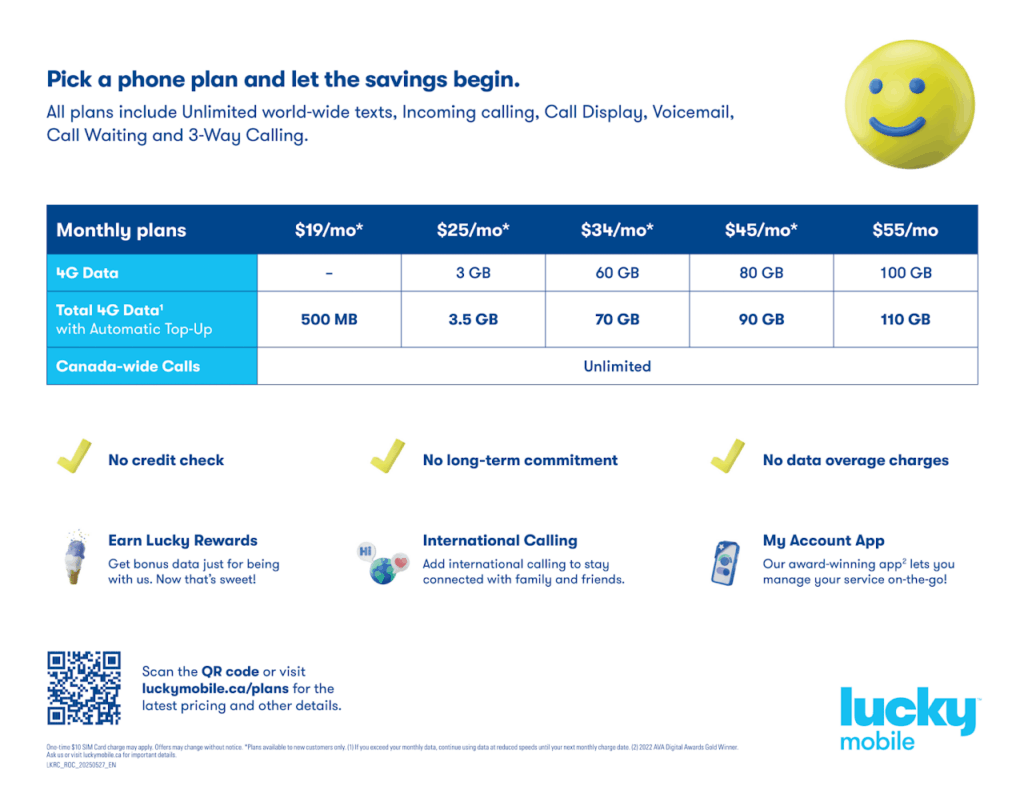
Current Offers (REST OF CANADA)

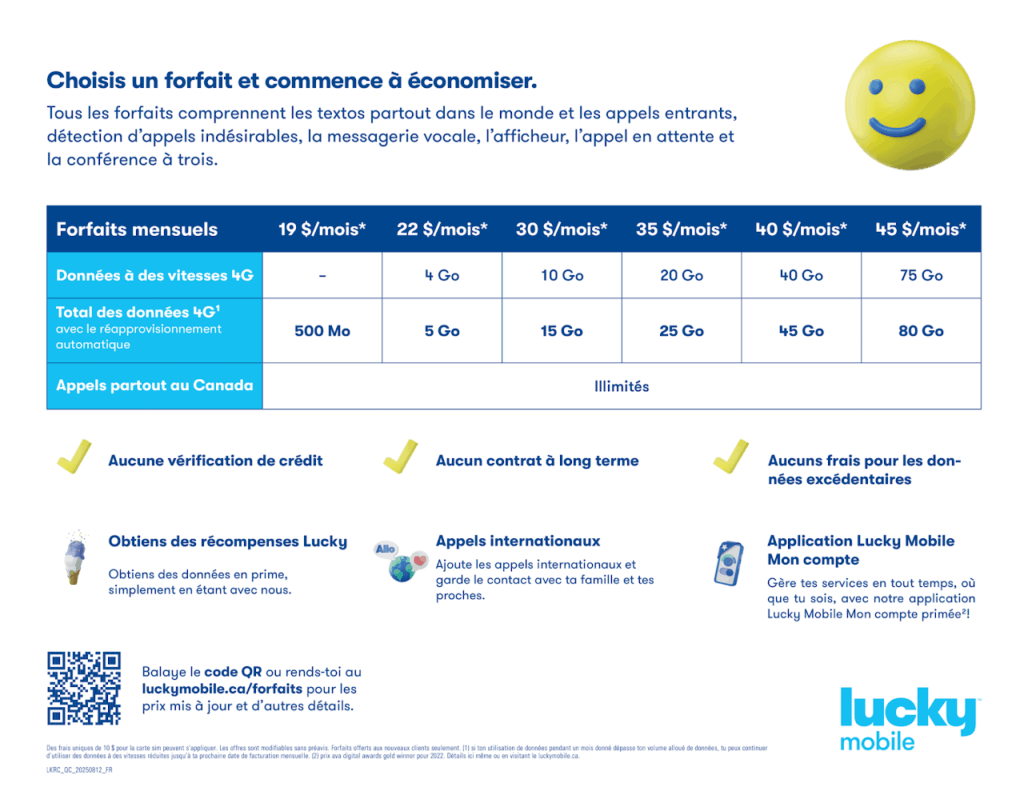
Current Offers (QUEBEC)

Events in December 2025

Monday Tuesday Wednesday Thursday Friday Saturday Sunday
December 1, 2025
December 2, 2025
December 3, 2025
December 4, 2025
December 5, 2025
December 6, 2025
December 7, 2025
December 8, 2025
December 9, 2025
December 10, 2025
December 11, 2025
December 12, 2025
December 13, 2025
December 14, 2025
December 15, 2025
December 16, 2025
December 17, 2025
December 18, 2025
December 19, 2025
December 20, 2025
December 21, 2025
December 22, 2025
December 23, 2025
December 24, 2025
December 25, 2025
December 26, 2025
December 27, 2025
December 28, 2025
December 29, 2025
December 30, 2025
December 31, 2025
January 1, 2026
January 2, 2026
January 3, 2026
January 4, 2026

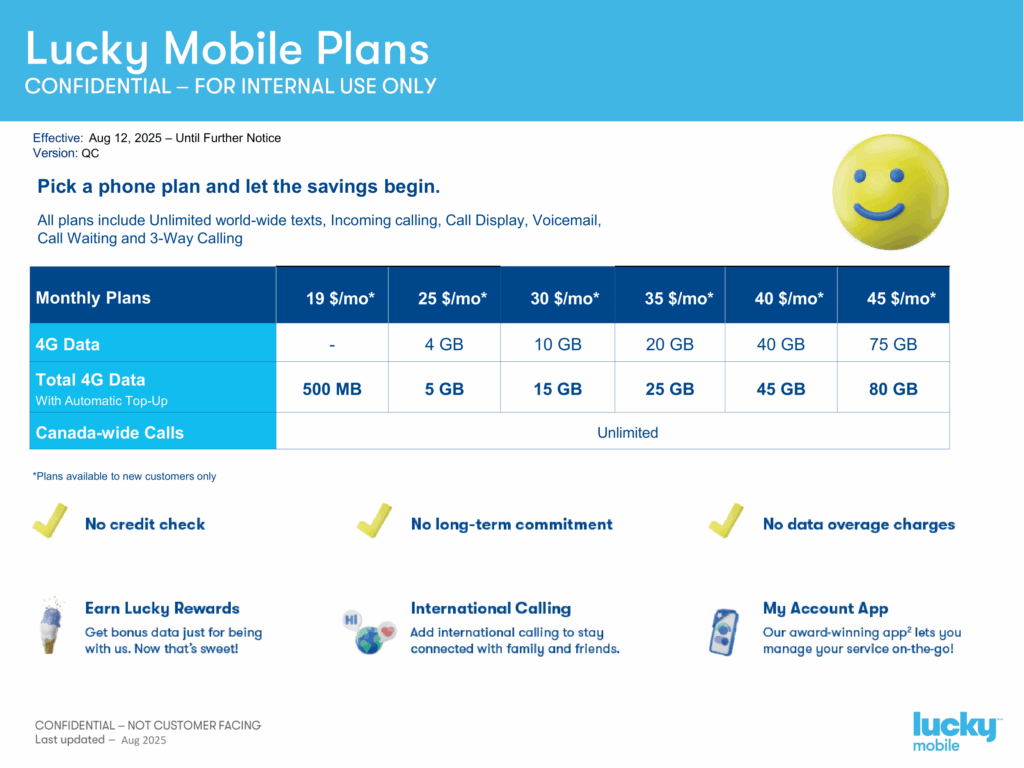
Plans

Last updated: August 19th, 2025
Last updated: August 12th 2025

Activation Help

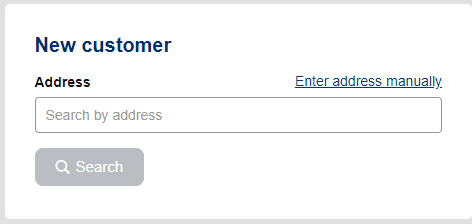
New Numbers

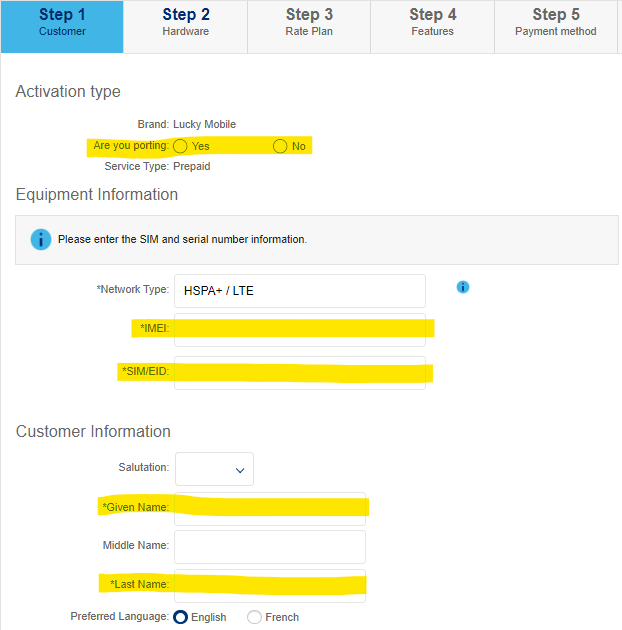
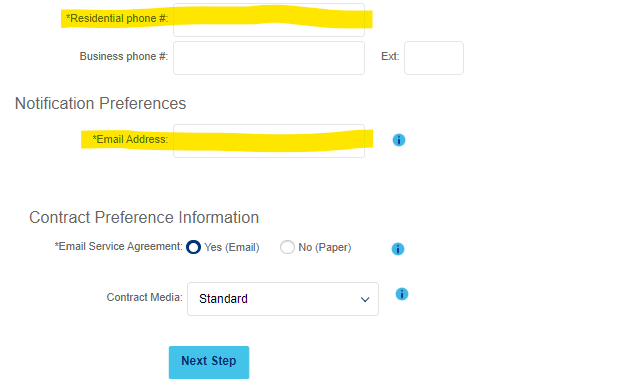
  1. You only need to fill out the fields we have highlighted in yellow!

    Once those fields have been completed, click ‘Next Step’


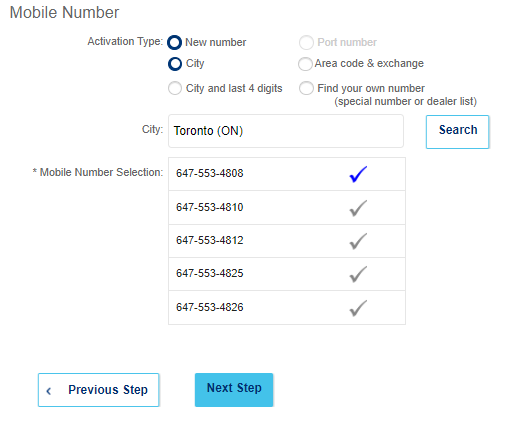
Once your customer agrees to the number, click ‘Next Step’

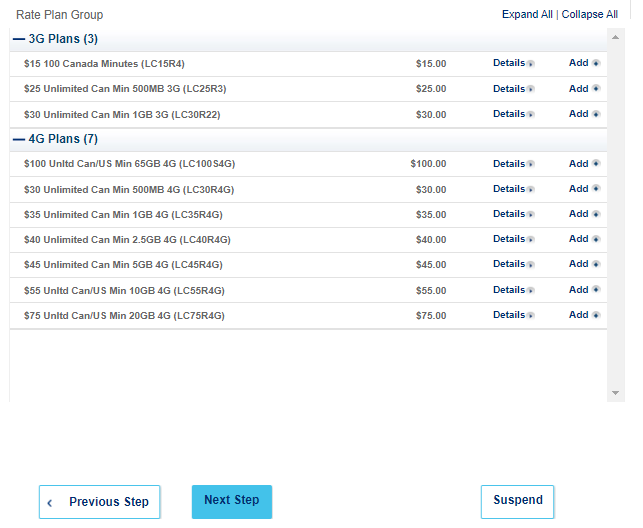
  1. To help your customer decide on a plan, show them the Plan Grid!

    Once your customer confirms the plan choice, click ‘Next Step’

Once your customer agrees to the number, click ‘Next Step’

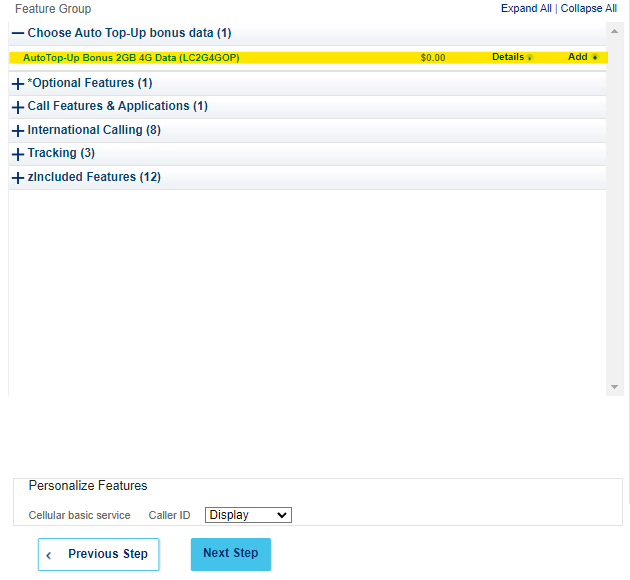
The main feature on this page is Auto Top-Up (highlighted yellow)


Auto Top-Up rewards customers with extra monthly data for providing a credit card on file. That credit card will be automatically charged the price of their plan every month.


Once the above has been completed, click ‘Next Step’

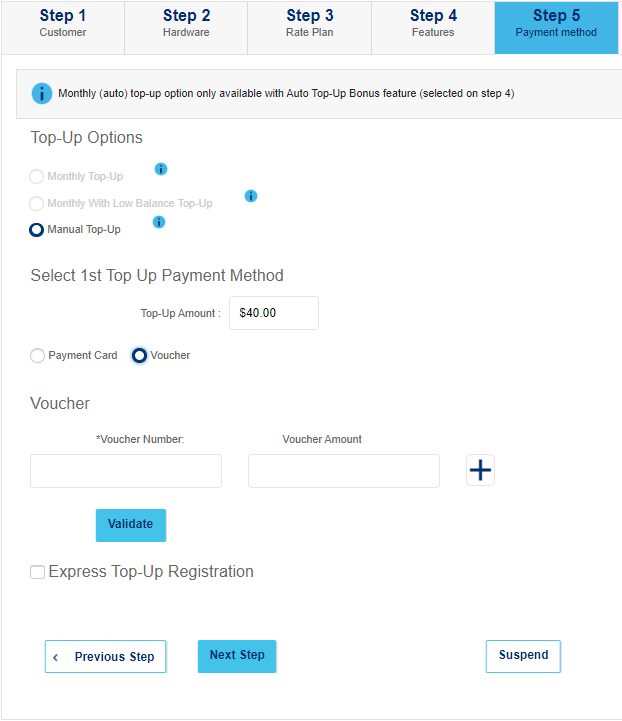
(You can print vouchers from WebStore, if you have an account)

Once the vouchers have been validated, click ‘Next Step’

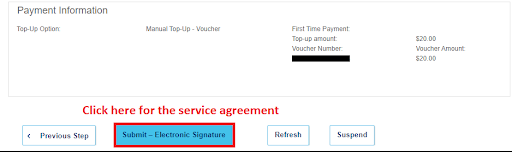
Review the plan

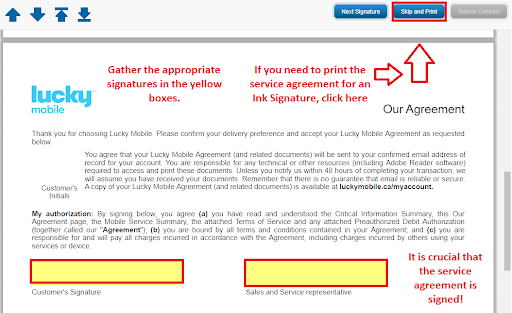
If all looks good, click ‘Submit – Electronic Signature’

Customer signature on agreement

Sign digitally or click ‘Skip and Print’ for a physical copy

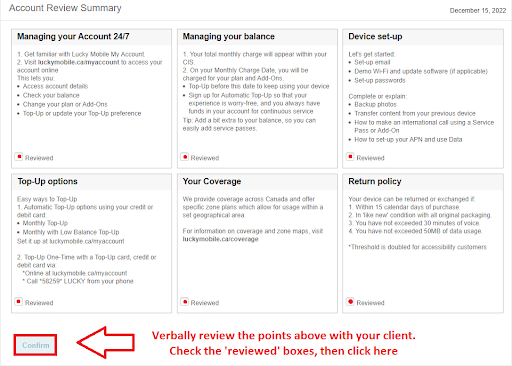
Final review

Check all the boxes, then click ‘Confirm’

Remove the SIM from the client’s phone, restart the device, insert the Lucky SIM, and the process is complete!

eSIM Activation Guide

** Before attempting to activate the eSIM **

Please ensure that your customer’s device has eSIM capabilities.
Lists (click here) of compatible devices can be found online 

You only need to fill out the fields we have highlighted in yellow.

Once these are filled, click ‘Get SIM”.
Then fill:


Once your customer agrees to the number, click ‘Next Step’

  1. To help your customer decide on a plan, show them the Plan Grid!


Once your customer agrees to the number, click ‘Next Step’

The main feature on this page is Auto Top-Up (highlighted yellow)

Auto Top-Up rewards customers with extra monthly data for providing a credit card on file. That credit card will be automatically charged the price of their plan every month.

Once the above has been completed, click ‘Next Step’

(You can print vouchers from WebStore, if you have an account!)

Once the vouchers have been validated, click ‘Next Step’

Review the plan

If all looks good, click ‘Submit – Electronic Signature’

Customer signature on agreement

Sign digitally or click ‘Skip and Print’ for a physical copy

Final review

Check all the boxes, then click ‘Confirm’

Scan this QR code using the Camera app on the client’s phone and complete the prompts that appear to finish activating the eSIM.

Porting from: Other Carriers

For steps on how to activate a new number, follow the steps in the ‘New Activation’ tab

Make sure you take note of the new number.

Leave the customer’s original SIM in their phone.

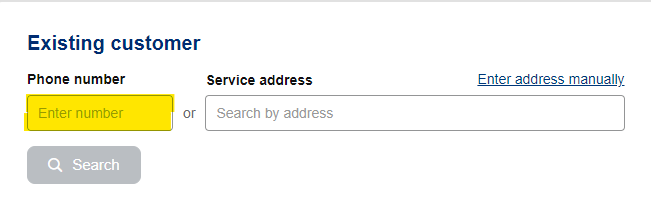
Search for the newly activated number
 

Under ‘existing customer’, enter the number for the SIM you just activated, then click ‘Search’

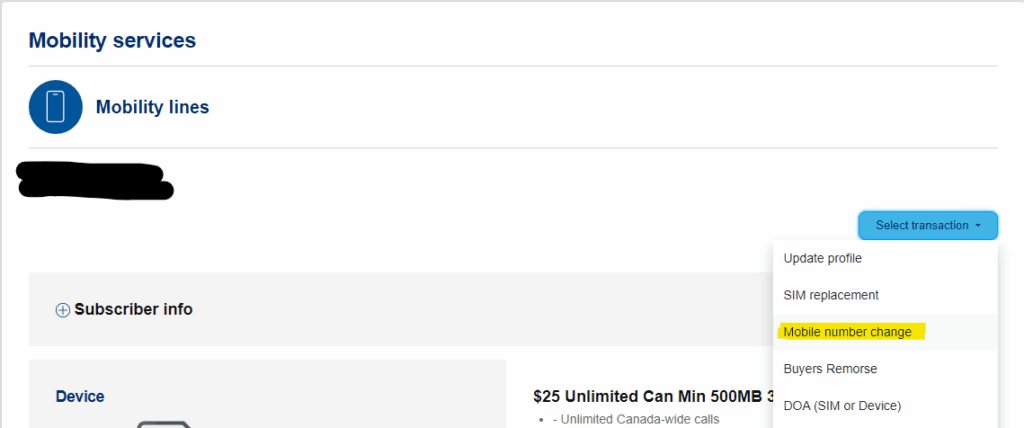
Start a Mobile number change
 

Once in the customer account for the Lucky SIM, expand the menu under ‘Select Transaction’ and click ‘Mobile number change’

Begin the port request
 

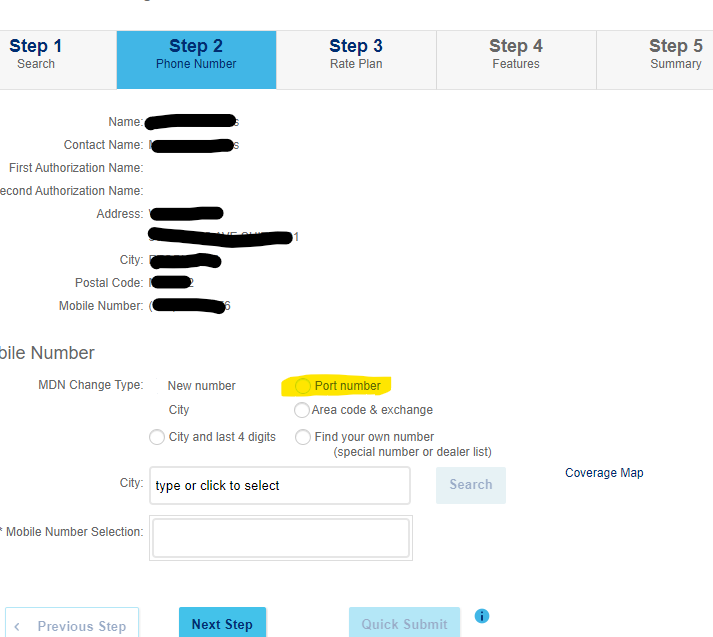
Under MDN Change Type, select ‘Port Number’ (highlighted yellow).

The webpage will reload with options different than the ones pictured.


Once this has happened, continue to Step 2

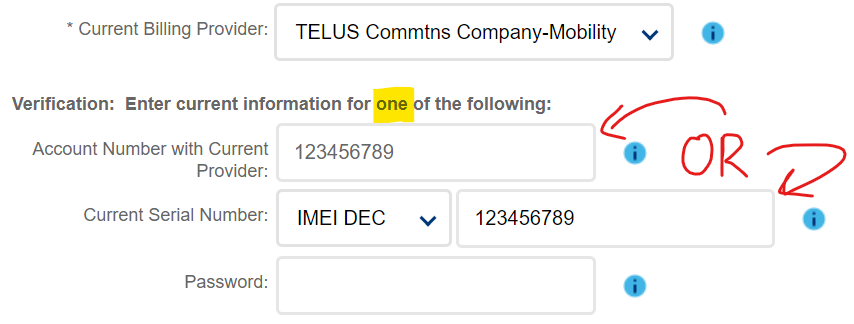
Verify account ownership
 

Enter ONLY ONE of the following:

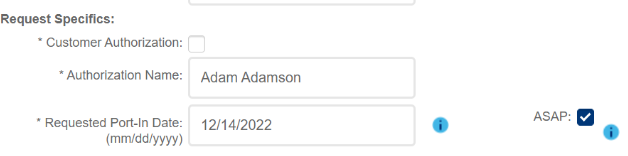
Authorize the port request
 

Your customer will receive a text message from their old carrier asking to authorize the port request.  

Respond to the text with the appropriate message to approve

Once the customer has authorized the Port Over, you may continue through the steps and submit. Pay attention to the following warning messages, which indicate issues with the port request. 

Once the request has been submitted and the port has been authorized via text, you may swap to the new Lucky SIM.

The port is now complete!

Porting from Bell/Virgin

To complete these ports, you must call Lucky Port Management at 1 (866) 907-4321

FAQ

Change Password

Steps to reset your OneView password.

Passwords for the Lucky Activation portal require a reset every 90 days.
If you fail to reset your password, your account will become locked.

If your account is already locked, please contact us using the info at the side of the page.

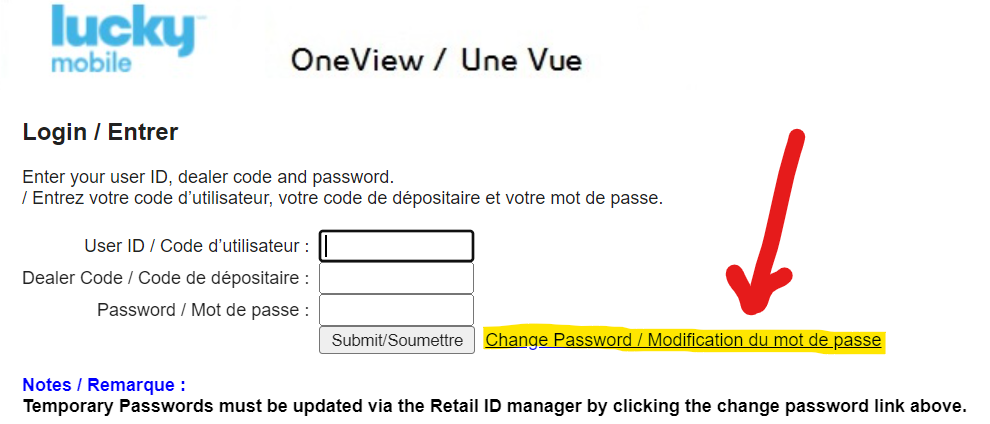
Launch OneView.

Click ‘Change Password / Modification du mot de passe’

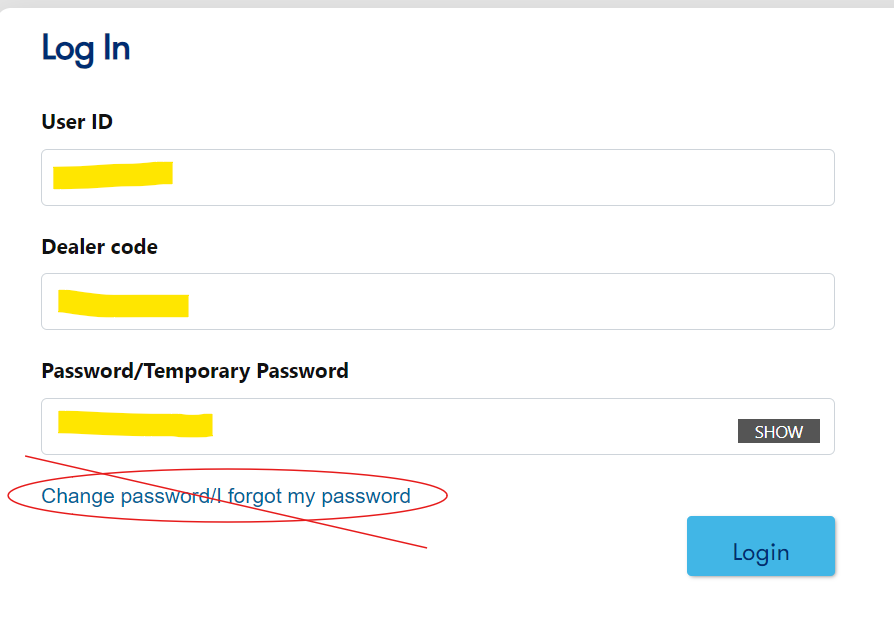
On the new page, do NOT click ‘Change password/I forgot my password’.


Instead, enter your User ID, Dealer code, and current password in the proper boxes, then click ‘Login’

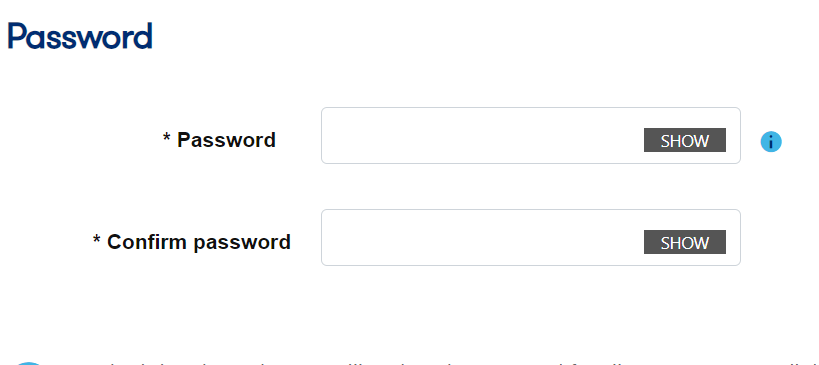
Enter your new password here.

The password must have…

Once your new password has been filled, click ‘Submit’

You can now only log in to OneView using your new password!

WebSocket Restart

Fixes both the ‘Access Denied. Only Authorized machines can access this site ‘ and the ‘Oops! ‘ error.

Close all browser tabs.

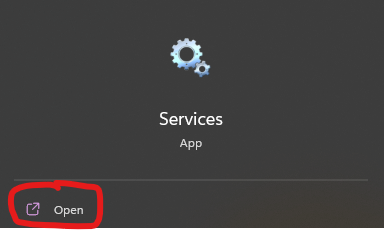
Press the Start button and search for ‘Services’.

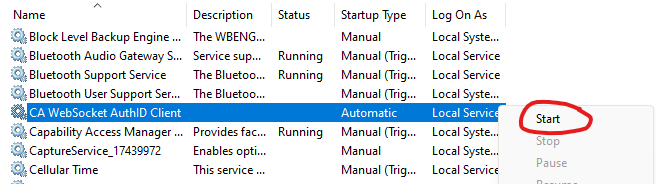
Search for ‘CA Websocket AuthID Client’.

Right click, and press Start.

You should be able to login to the portal after these two steps. 

If you are still having issues, feel free to contact us for assistance!

Account

Watch this video demonstration to see how to change your Lucky portal password

Please submit a request using our Order SIMs form.

You can register your computer at https://rma.bell.ca/.

If you have not received an authorization code, please contact us. 

Billing Inquires

Commissions for activations are paid out by the month, arriving in your account ~45 days after the month of activation.

For example, you would receive your commission payment for all activations in the month of January on (or around) March 15th.

If a new customer does not Top-Up for a second month, or is ported out within the first 30 days, the value of the account will be subtracted from your statement.

To prevent this, avoid porting your Lucky Mobile customers to other carriers.

Quick links

Need HElp?

Andre Charlebois
Program Manager
[Cell] (416) 710-8897
simdealersupport@nowprepay.ca

Will Ivens
Program Specialist
[Cell] (647) 327-4576
simdealersupport@nowprepay.ca